This is for users with admin access to Merlin Tickets. You can access the admin area by viewing your website (e.g. https://merlindemo.merlintickets.co.uk) then adding /admin to the end of the URL (e.g. https://merlindemo.merlintickets.co.uk/admin)
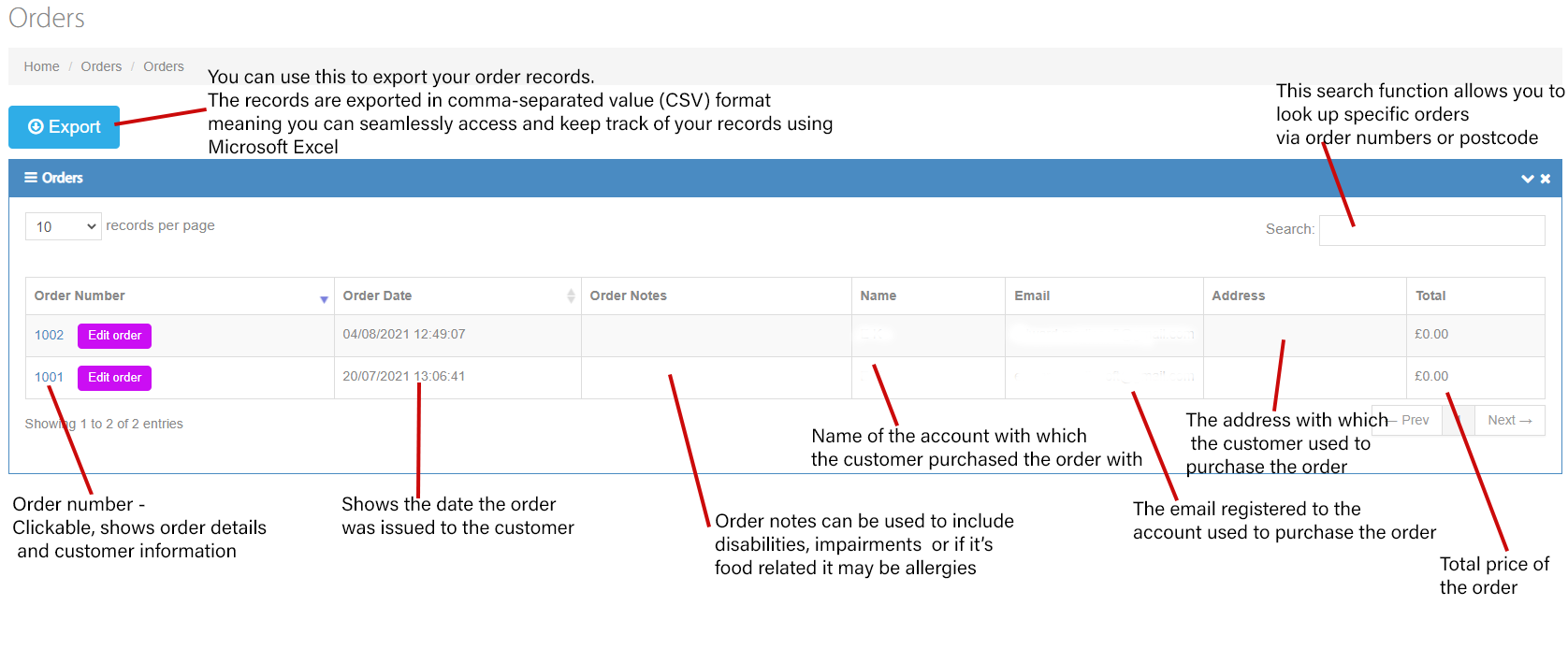
Orders allow you to get a report on each purchase and the status of it. It is an extremely vital tool as it provides you with customer details in the event of customer confusion. I.e. If the customer forgets what they have purchased, all they would have to do is contact you and provide their name, with this information you can go to the orders menu and search through the orders using their name to find information on their order.
To see all orders in Merlin Online, use the navigation panel on the left then select "Orders > All Orders"
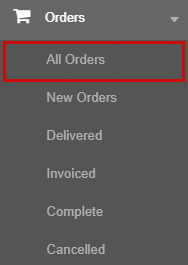
New orders: This sorts all the orders by newest first
Delivered: This shows all the orders sent to the customer (i.e. tickets)
Invoiced: This shows all the orders that have had payment taken for
Complete: This shows all the successful orders made
Cancelled: This shows all the orders that you have cancelled (i.e. refunds, change of date)
Note: To enlarge the image use 'Ctrl' and the '+' key to zoom in. Alternatively, right click (hold down, if on mobile) on the image and then click "Open image in new tab", this will automatically enlarge the image.
0 Comments